Getting Started with the Keyboard
GetMyDetails puts all your data at your fingertips using a powerful keyboard
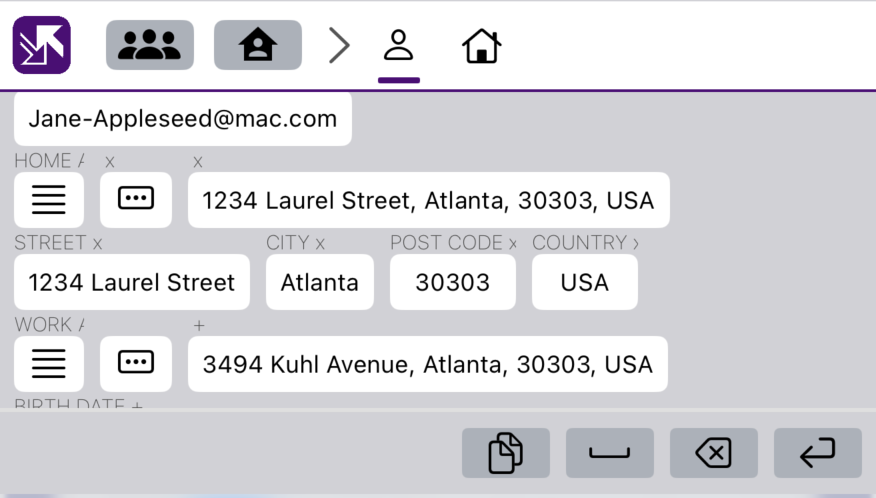
GetMyDetails reimagines the keyboard for the demands of everyday life, letting you put key information into forms, apps, emails, PDFs, web pages, everywhere really, without you needing to remember it, find it, or type it out! It lets us change the way we work now, without requiring businesses to change the way they work.
The traditional one-symbol-per-key is replaced with a one-field-per-key approach. Need your son's email address? No problem. Press their person, then press their email address. Want your whole home address in a variety of formats? Old home address? Date you moved in? Passport number? As long as you entered it into GetMyDetails, it will be there on the keyboard, available with a single press, it's like auto-fill but without the frustration of it not working on the website or form that you want to fill in.
How do I access the keyboard?
The keyboard is already installed as part of GetMyDetails, but you need to tell the phone to enable it. We cannot do this for you, it is a security rule enforced by Apple. It just takes a few steps although these may be on screens you have not seen before. Here is what to do:
- Open the "Settings" app on your phone or tablet.
- Scroll down until you find the "Apps" section at the bottom, click this.
- Scroll down until you find the section for "GetMyDetails" section. Click this.
- Towards the bottom of the first section, you will see "Keyboards", click this.
- There is a button for "GetMyDetails", switch this on.
- Another button appears labelled "Allow Full Access", switch this on. At this point you will get a warning from Apple about the consequences. But as you use our keyboard, you will see it only ever displays information you have already provided to GetMyDetails, all your credit card information remains in the phone in the usual place, you do not enter this using our keyboard and even if you did, it remains on your phone.
- Click "Allow". The keyboard will now be installed and operational.
Now when you want to enter text, you will see a "globe" button in the bottom left of the displayed keyboard. Press this to cycle through keyboards, or press and hold to select the one you want directly. Selecting GetMyDetails will show the keyboard, a bit like the image above, except with your data. To go back to the normal keyboard, repeat the process, but press the system keyboard. It is usually labelled "English (UK)" or whatever language you are using as your default.